
Appearance
Names and terminology
Access: an operator for the console's available Transformation controls; organisation term lists may require administrator access.
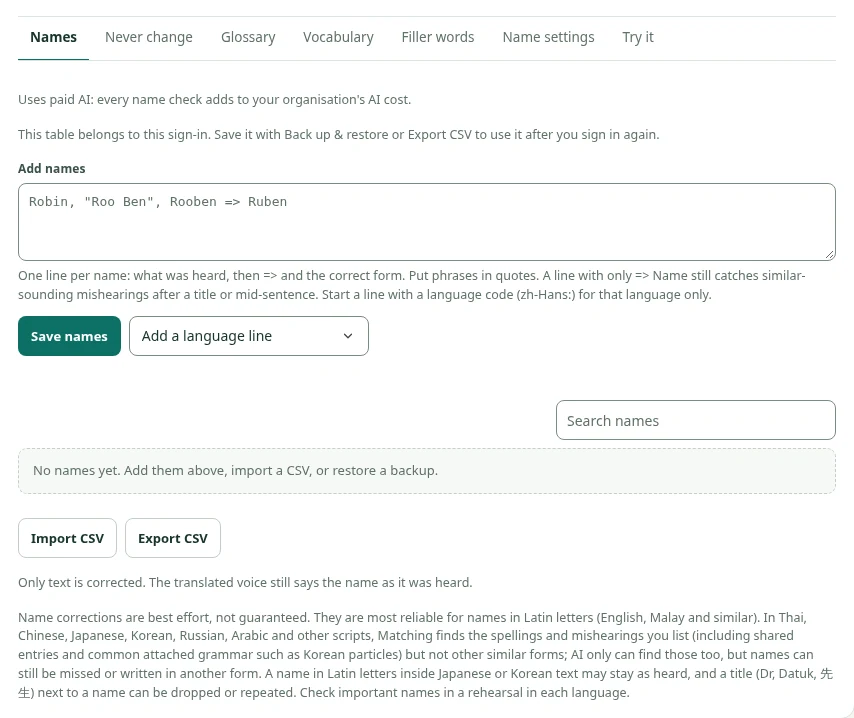
Use More options → Transformation to improve the written output for your event's names and terms.
Prepare before the event
- Names: add expected names and any permitted alternative spellings or common mishearings.
- Never change: protect words that should remain exactly as entered.
- Glossary: provide preferred term wording for the translation experiences that support it. In Subtitles only it goes into each paid translation request, so a long glossary adds to the AI cost.
- Vocabulary: provide specialist spellings for the recognition/caption experiences that support them. Long lists add a little to the AI cost in Subtitles only.
- Filler words: choose whether supported text should omit conversational fillers.
Read each control's availability note. A list used by one experience may not apply to every translation type.
In languages that write grammar onto a name in the same word, enter only the name itself. Korean particles (김민수가, 김민수에게), Tamil, Bengali, Marathi, Nepali and Gujarati endings, and Arabic and Hebrew prefixes (وسعيد) are recognised: only the name part is corrected and the attached part stays as written. A word that only starts with a listed name is not changed, and a name or spelling shorter than 3 letters is matched only as a whole word (for those, add each common form as its own line with its corrected form, for example 민서가 => 민수가).
How names are corrected
- Changes apply at once. A name you add, change or remove takes effect straight away, also for languages that are already translating. How names are found and Ask AI when unsure apply to the main language when you next press Start; an extra language may take them up sooner (for example when it starts or wakes from Autosleep). To apply a change everywhere, press Stop, then Start.
- AI checks cost money. Ask AI when unsure (on by default) and How names are found → AI only use a paid AI service: every check adds to your organisation's AI cost, more with many languages, and in AI only also with long name lists. Any change in Name settings that switches paid checks on (these two, or Correct names using this table or Match similar-sounding names back on while Ask AI when unsure is on) asks you to confirm (Turn on); Cancel leaves it as it was. Uses paid AI shows at the top of Transformation, on every tab, while the settings allow checks for the next Start or for a language already running. Restoring a backup whose name settings switch checks on says so in the preview. In Subtitles only, the glossary is sent with every translation request, so a long glossary also adds to the AI cost.
- Listed spellings: corrected straight away. A listed name, and each mishearing you wrote before
=>(Robin, Rooben => Ruben), is corrected as it arrives. - Only similar: checked first. Anything else that only looks or sounds like a listed name (a changed vowel, a letter added or missing, a different first sound, a name written as one word) is checked against its sentence when Ask AI when unsure is on, and is corrected only when that check agrees. Without that check, or when it does not answer in time, the caption keeps what was heard (or shows … when that option is on).
- Similar people and words: the check can still accept another person whose name is very close to a listed one (Aziz Rahman when Aziz Rahim is listed, Valentino when Valentina is listed) or, rarely, a capitalised word that looks like a listed name. If such a person may be mentioned, add them to the list too: both are then kept as they are.
- Who answers the check: the platform owner chooses the engine; a check one engine cannot answer in time goes to a backup engine, so a single engine's outage does not stop name checks. All of them answer within the console's own short wait (about a second): a slow engine leaves the next one its share. Name checks are offered whenever at least one engine is set up.
- When the AI service is busy: if checks are turned away for lack of capacity, they pause for a few seconds, longer (up to five minutes) while the refusals go on, and start again by themselves. Meanwhile listed spellings and the mishearings written before
=>are still corrected; anything that needs the check keeps what was heard (or shows … when that option is on). - Mishearings you see often: add them before
=>on the name's line. They are then corrected straight away, also without the check. - Size: up to 300 names, each with up to 24 heard-as forms per language.
Save and test
- Add a small set of relevant names or terms.
- Save the list and confirm success.
- Use Try it with a representative sentence where available.
- Run a short spoken rehearsal and check the real captions.
- Correct unwanted changes and test again before the live event.
Keep similar names distinct and avoid adding unnecessary large lists. In Try it, a name that would be checked first is underlined with a dashed line and says which name it may become; the live captions then follow the check's answer. Do not paste confidential source material into a terminology test.
Know the limits
Name corrections are best effort, not guaranteed. They are most reliable for names in Latin letters (English, Malay and similar). In Thai, Chinese, Japanese, Korean, Russian, Arabic and other scripts, Matching finds the spellings and mishearings you list (including entries shared by every language and common attached grammar such as Korean particles) but not other similar forms; AI only can find those too, but names can still be missed or written in another form. A name in Latin letters inside Japanese or Korean text may stay as heard, and a title (Dr, Datuk, 先生) next to a name can be dropped or repeated. Check important names in a rehearsal in each language.
Written corrections do not necessarily change the spoken translated voice. A corrected name in subtitles is not proof the audio pronunciation changed. Check both separately.
A summary or transcript can still contain errors. Ask a bilingual reviewer to verify important names and numbers. High privacy mode can disable terminology features that retain or analyse text; use the reason shown beside the control.