
Appearance
Welcome and closing event messages
Access: console operators can edit This event messages for their own Companion links. Organisation administrators can also edit Organisation default. Campaign messages require the campaign’s authorised administrative access.
Use messages for practical event instructions, welcome text and closing information. They supplement the privacy notice; they are not a replacement for it.
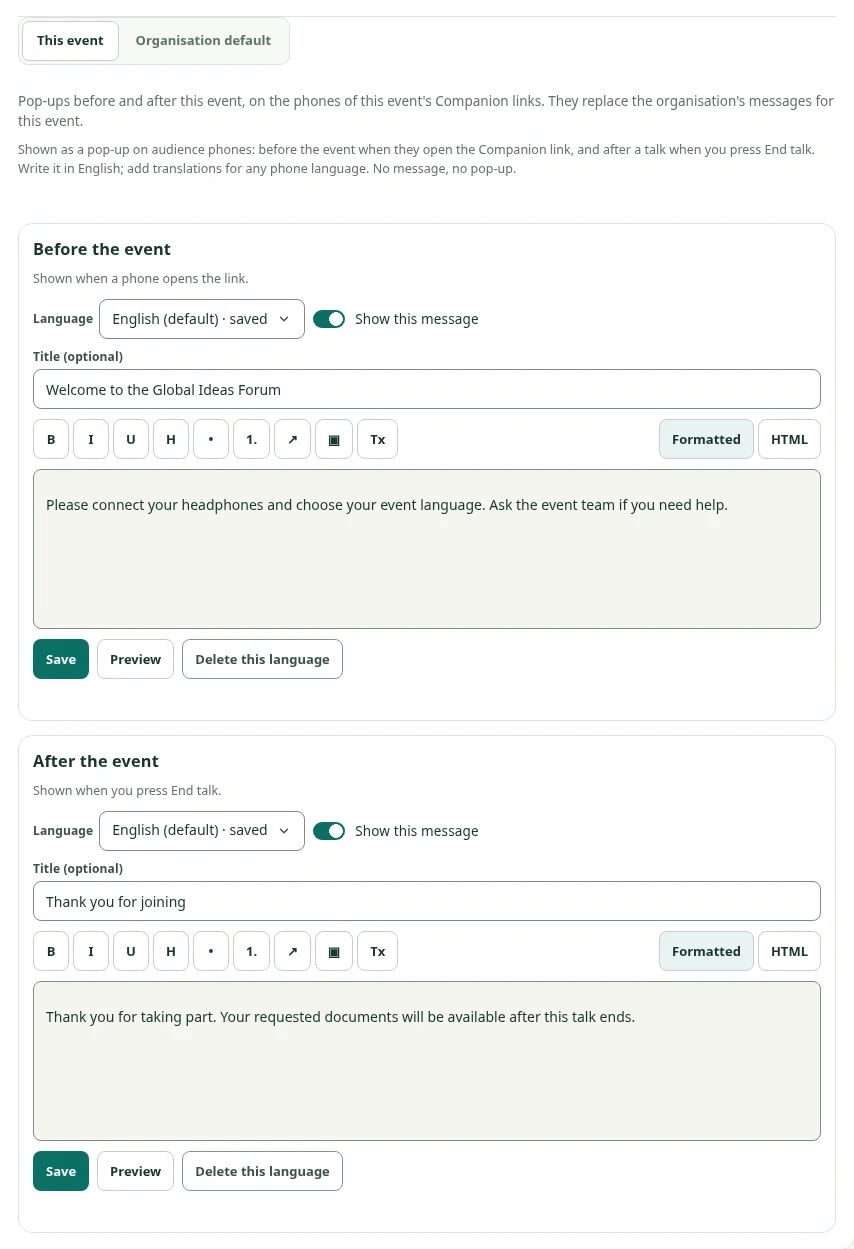
Configure console event messages
- Open More options → Event messages.
- Select This event to set messages for this console’s Companion links. These replace the organisation’s messages for this event.
- If you are an organisation administrator, choose Organisation default only when changing the fallback used by events with no messages of their own.
- Write Before the event and/or After the event content and add the available language versions when needed.
- Preview each message, check links/dates/language, then save and test it on an audience phone.
Leave an unneeded message empty. Check which organisation or event the editor applies to before saving.
When they appear
The before-event message is shown when a phone opens the applicable link. The after-event message is shown when the operator ends the talk with End talk (with End and send or End, don't send), once for that talk; a Stop on its own closes the talk as a test and phones show Paused instead. Confirm this during a short rehearsal, especially in an event with several talks.
For campaign stations, use the campaign's Event messages action and test the station and its phones. Campaign-specific messages and branding should match the organiser's intended event.
Avoid including credentials, confidential speaker notes or private contact information in an audience-facing message.