
Appearance
Recordings, transcripts and sessions
Access: an authorised operator or reviewer within their permitted scope. Saving must be enabled before the relevant speech.
Choose what to save
Review each language's ⋯ menu before Start. Available options include Record, Save SRT and Save Markdown. Settings can provide defaults for newly added languages, but review the actual run's choices.
- A recording stores the permitted audio output as mono speech. A browser that cannot record the usual format (Safari) saves at a higher rate, so the sound stays as clear.
- SRT is a timed subtitle file for compatible video/subtitle tools.
- Markdown is a readable text document: a heading with the talk and language, a line with the hall, talk and time, the spoken language, then the speech as paragraphs, each marked with the minute it began (for example 09:02). A Markdown file saved before 14 November 2026 is re-arranged the same way when you download it.
- Listener summary/transcript PDFs are a separate document-delivery feature.
Finish saving
Press Stop and keep the page open until the save status completes. If saving is pending, follow the retry/recovery message. Do not close the tab or reset the console simply because live translation has ended.
A connection interruption may leave recoverable pending work in the same browser. Reopen with the same account on that device and review the recovery prompt. Recovery is bounded and is not a substitute for deliberately saving and checking important files.
Find and download files
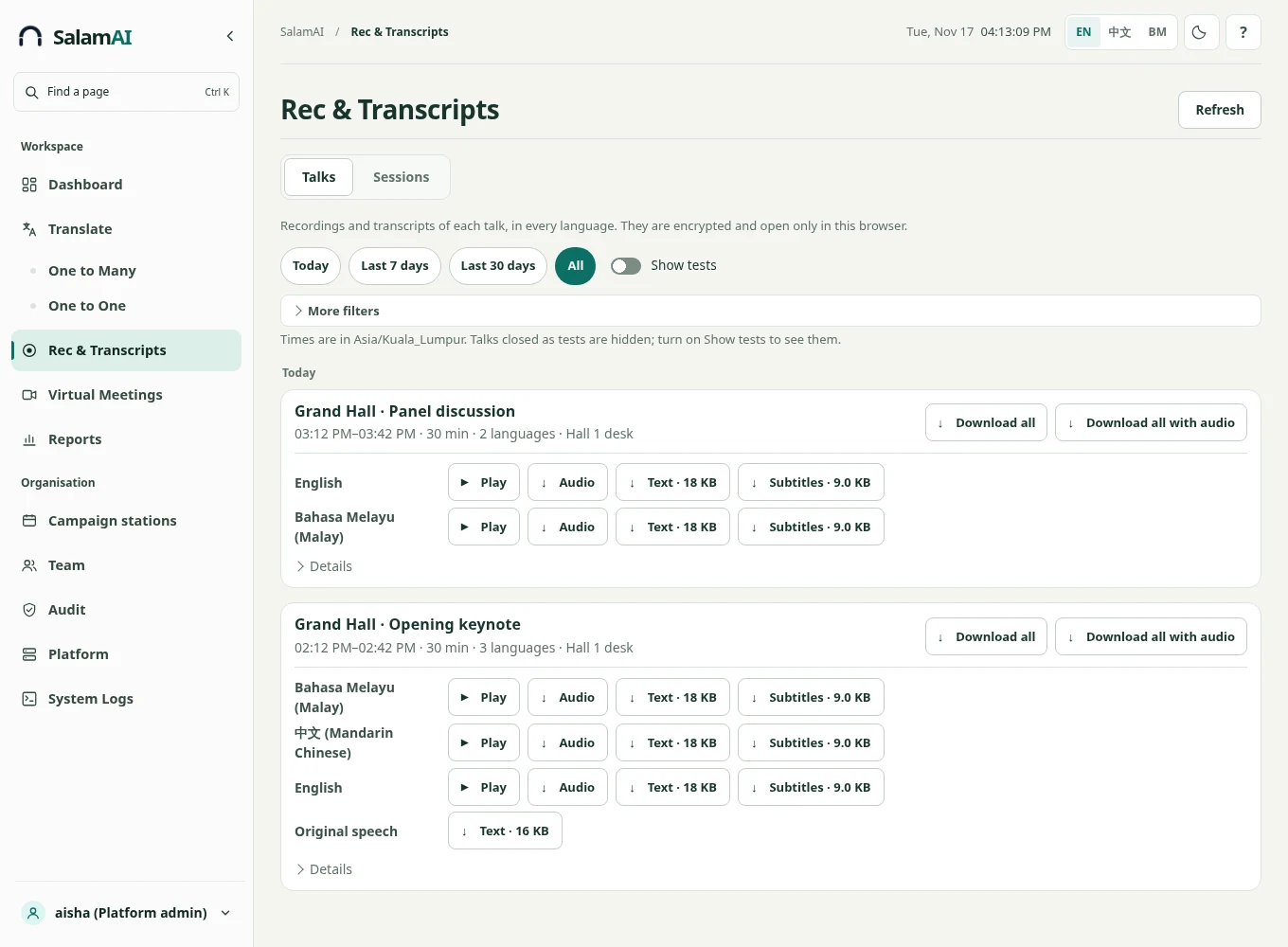
Open Rec & Transcripts. Two views sit at the top: Talks (it opens first) and Sessions. Talks shows one card per talk: its hall and talk name, start and end time, length and languages, then one line per language with its recording (Play, Audio) and its files: Text is the readable transcript (a Markdown .md file) and Subtitles is the timed subtitle file (an SRT .srt file), each with its size, for example Text · 18 KB. Hovering over a file button names its format. The original speech has its own line when it was saved. A recording kept in several parts lists each part under it. A session without a talk (campaign stations, High privacy, or a console whose talk could not be recorded) is a card of its own; a One to One conversation started from the console is a talk like any other. Details shows who ran it, the translation type, the capture and how long the files are kept.
- Download all saves every transcript file of the talk in one .zip, decrypted in your browser.
- Download all with audio saves the same files plus every recording of every language, decrypted in your browser. Each recording keeps its own audio format (for example .webm). Recordings make the .zip much larger: when it would be very large (above about 600 MB) the console asks first, and a .zip cannot be larger than 4 GB. Keep the page open until the download starts. If a talk is too large for one .zip, download its files one by one.
- File names say what they hold: date and time, hall, talk, language and translated or original, for example
2026-11-14 0902 Grand Hall - Opening keynote - Malay (translated).md.
Filter the talks
- Today, Last 7 days, Last 30 days and All choose when the talk started and apply at once. All is the default.
- Talks closed as tests are hidden unless Show tests (beside them) is on; a test talk then shows the Test badge. A talk that is still running shows Live.
- More filters holds From and To, Minimum length and Reset filters. Changes there apply at once.
- From and To take a date and, if you want, a time of day to narrow it to part of a day; times use this browser's time zone (named under the filters).
- Minimum length leaves out shorter talks, such as sound checks: choose, for example, 10 min or longer.
- Reset filters clears the dates and shows every length again. Your browser remembers Minimum length and Show tests.
- Load more at the end of the list continues with the same filters.
If a file is absent, check the filters (including Show tests), language, retention and whether saving was enabled before speech occurred.
Sessions view
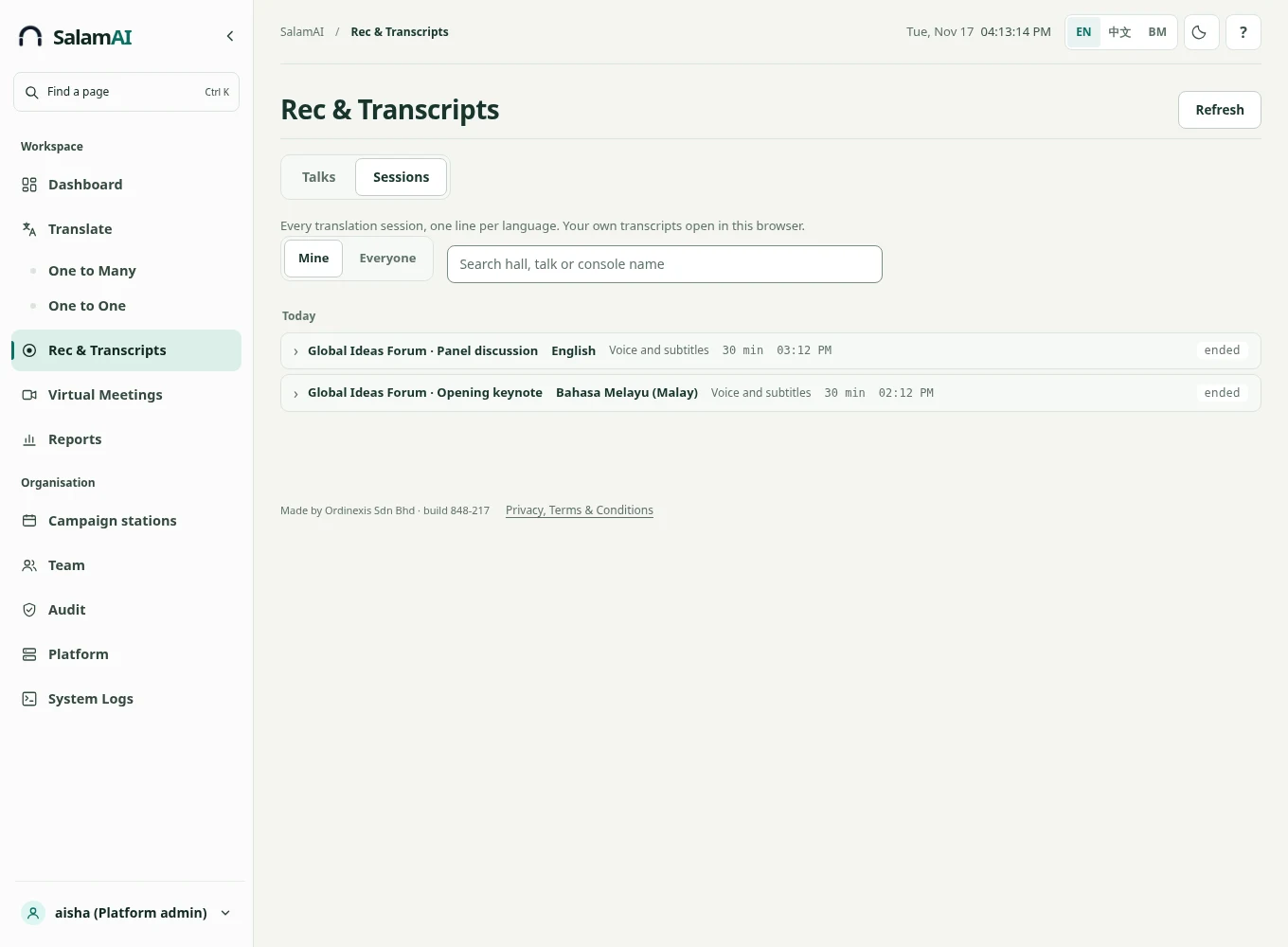
Sessions (it used to be the History page) lists every translation session, one line per language, grouped by day. Old History links and typing "History" in Find a page (Ctrl+K, or Command+K on a Mac) open this view.
- Each line shows the hall and talk, the language, the translation type, the length, the start time and whether it is still running. Open a line for its details: Translation type, Capture, Started, Ended, How it ended and the Session id.
- For your own sessions with a saved transcript, the details offer View (opens it in this browser; Search this transcript… finds words in it and Close leaves it), Copy and Delete.
- Search with the box Search hall, talk or console name; Load more reaches older sessions.
- Administrators can choose Mine or Everyone. Everyone groups the organisation's sessions by person and shows their details only: transcripts open only for the person who ran the session.
Sessions is a record of what ran. The downloadable files of a talk are in Talks.
Retention and deletion
Files are kept within the organisation's retention policy. Campaign files can have a separate download window. Download authorised copies before expiry and store them according to the event's policy.
High privacy sessions disable content saving and do not retroactively erase older standard-session files. Deleting a stored file does not delete copies already downloaded or emailed.